
Graphite Clipboard Extension for Seamless Copy-Paste
Overview
The Graphite Clipboard Extension is designed to enhance clipboard functionality within the Graphite platform, enabling users to leverage standard system-wide copy, cut, paste, and selective paste operations through intuitive right-click menus and toolbar options. Without this extension, users are limited to keyboard shortcuts for clipboard actions, which can hinder workflow efficiency, especially during complex table manipulations. This tool bridges the gap between the Graphite interface and native operating system capabilities, offering a more natural and accessible experience for users who rely on mouse-driven workflows.
Primarily intended for professionals and power users working with data-heavy environments in Graphite—such as analysts, researchers, and content creators—this extension streamlines repetitive tasks and improves precision during data transfer between cells, tables, and external applications. Its integration with the Graphite ecosystem suggests a focus on productivity, particularly in scenarios requiring frequent copying and pasting across structured data formats.
The developer, Graphite, has positioned this tool as a functional enhancement rather than a standalone application, indicating a commitment to improving user experience within its core platform. While no additional developer background was provided, the extension’s purpose aligns with modern productivity trends emphasizing seamless interaction between tools and operating systems.
Key Features & Capabilities
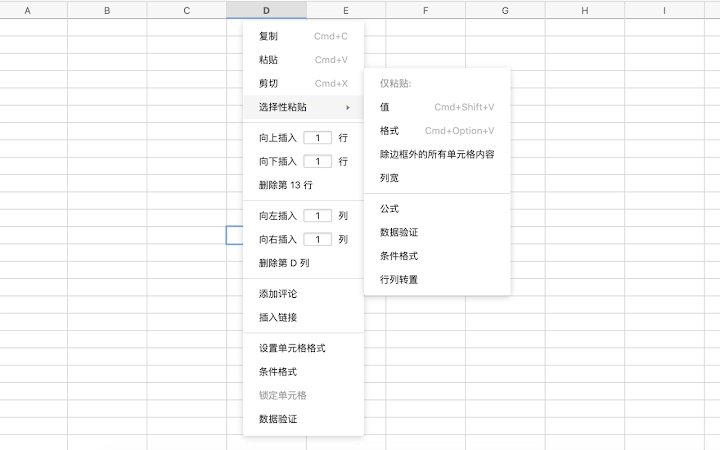
- Right-Click Menu Integration – Enables access to standard clipboard actions directly from the context menu, allowing users to cut, copy, paste, and use selective paste without relying on keyboard shortcuts.
- Toolbar Accessibility – Provides visible buttons for clipboard functions in the Graphite interface, supporting users who prefer visual navigation over key combinations.
- System Clipboard Synchronization – Ensures that copied content from Graphite is available across other applications and vice versa, enhancing cross-app workflow continuity.
- Enhanced Table Editing – Specifically optimized for operations within tables, allowing smooth copying of cell ranges and pasting into other tables or documents with preserved formatting.
- Seamless Workflow Integration – Functions without requiring changes to existing Graphite workflows, making it easy to adopt for both new and experienced users.
For example, a data analyst can select multiple rows in a Graphite table, right-click, and paste the data into a spreadsheet or report without switching to keyboard mode. Similarly, a content creator can copy formatted text from an external source and paste it directly into a Graphite document using the toolbar, maintaining styling and structure.
User Interface, Workflow & Performance
The Graphite Clipboard Extension integrates directly into the Graphite user interface, extending the existing toolbar and context menu without altering the core layout. Navigation remains consistent with the host application, ensuring minimal learning curve for users already familiar with Graphite’s interface.
Workflow efficiency improves significantly, as users can perform clipboard operations using mouse-based interactions, which is particularly beneficial during detailed data manipulation tasks. The extension does not introduce additional windows, pop-ups, or settings panels, maintaining a lightweight and unobtrusive presence.
Performance observations are based on general software behavior patterns. The extension operates in the background and does not appear to impact the responsiveness of the Graphite application. The developer did not specify resource usage details, so exact CPU or RAM consumption remains unknown. Stability is expected to align with the host application’s performance, though no independent testing data was provided.
Compatibility & System Requirements
The Graphite Clipboard Extension is compatible with both Windows and Mac operating systems, supporting a broad range of desktop environments. It is designed to function as a browser-based extension within the Graphite platform, ensuring consistent behavior across supported devices.
The installation size is 1.2 MB, indicating a lightweight footprint. No specific hardware requirements were listed, and the developer did not provide additional system requirements. Compatibility information was partially provided, with support confirmed for Windows and Mac, but no details on specific OS versions or minimum specifications.
Pros and Cons
Pros
- Enables right-click and toolbar-based clipboard actions in Graphite
- Eliminates dependency on keyboard shortcuts for common operations
- Improves workflow efficiency for mouse-oriented users
- Lightweight at 1.2 MB with minimal system impact
- Free to use with no licensing barriers
Cons
- Requires Graphite to function—does not work as a standalone tool
- Exact system requirements were not listed
- Performance metrics not publicly disclosed
- Only available for Windows and Mac platforms
- No visible update notifications or changelog access
FAQ Section
Is the Graphite Clipboard Extension compatible with all versions of Graphite?
The extension is designed for use with the Graphite platform, but specific compatibility with Graphite versions was not detailed by the developer.
Does this extension work offline?
As a browser-based extension integrated with Graphite, it functions when Graphite is accessible, including in offline modes if the host application supports them. However, no confirmation was provided regarding offline capabilities.
Is the extension secure to install?
The extension is developed by Graphite and distributed through official channels. No security risks were reported, but users should only install extensions from trusted sources.
How often are updates released?
Update frequency was not specified. The developer did not provide information on release schedules or automatic update mechanisms.
Can I use this extension on multiple devices?
Since the extension is tied to the Graphite platform, its availability across devices depends on the user’s Graphite account and device setup. No restrictions were mentioned, but no details were provided on cross-device synchronization.
Final Thoughts
The Graphite Clipboard Extension delivers a focused, high-impact improvement to the user experience within the Graphite environment. By restoring full clipboard functionality through right-click menus and toolbars, it removes a significant workflow limitation for users who rely on mouse-based interactions. The free availability and lightweight design make it accessible to a wide range of professionals, especially those engaged in data-heavy tasks.
While the extension lacks detailed system specifications and update transparency, its core purpose is clearly fulfilled. For anyone using Graphite regularly and frustrated by keyboard-only clipboard access, this tool is an essential addition. Its seamless integration and immediate usability offer real productivity gains.
Download Graphite Clipboard Extension now







